Creative 27B understands images and video, designs the system, and produces the execution blueprint. Code 27B turns it into complete repository changes. Assistant 9B handles the fast lane while Olivia silently selects the exact tools and context.
Three protected production lanes, one semantic dispatcher, and one role-correct execution flow across Vigthoria Code, CLI, Workbench, Operator and the wider ecosystem.
Executes complete repository changes after architectural planning: backend and frontend implementation, security analysis, deep debugging, refactoring, tests, and tool-aware code operations.
Understands screenshots, designs, diagrams, photographs, and long video; then turns that evidence into system architecture, research synthesis, multi-step plans, and creative direction.
Fast chat, Fill-In-The-Middle completion, streaming assistance, voice workflows, classification, and immediate diagnostics without consuming the heavy execution lanes.
Every request is bound to the appropriate production role. Older saved preferences normalize to v4.2 without reactivating retired inference lanes.
Maps intent to the minimum capability, route, and toolkit context before the architect or executor runs. Olivia does not chat or execute code.
Inspect UI screenshots, diagrams, visual defects, art direction, documents, and real-world scenes inside the same architecture workflow.
Analyze temporal sequences, interface recordings, gameplay, production footage, and visual continuity before planning or review.
Complex jobs are planned before execution. The executor receives decisions, dependencies, constraints, and exact tool context instead of rebuilding architecture from scratch.
Olivia provides only the required toolkit. Creative 27B interprets visual and textual evidence and fixes the architecture. Code 27B executes last, with a governed fallback to Assistant 9B for lightweight work.
The Vigthoria Model Router exposes only the governed family: Creative v4.2, Code v4.2, and Assistant v4. Olivia performs semantic dispatch separately. Sovereign Blackwell inference powers the local lanes; controlled cloud capacity is admitted only by routing and financial policy.
Economical coding and build tasks.
Default cloud chat and mixed workloads.
Lightweight cloud responses.
Premium analysis and code review.
Explicit premium selection for the hardest reviews. It is never chosen by automatic fallback.
Sophie Browser, ViAgen7, Code, CLI, and Workbench — plugins (VSIX, DevTools Bridge) under Plugins.
Desktop ecosystem browser — guest browse free; Pro unlocks cloud AI & Vigthoria CLI sidecar.
Agentic application builder with governed planning, execution, sandbox, publishing, and VigBase integration.
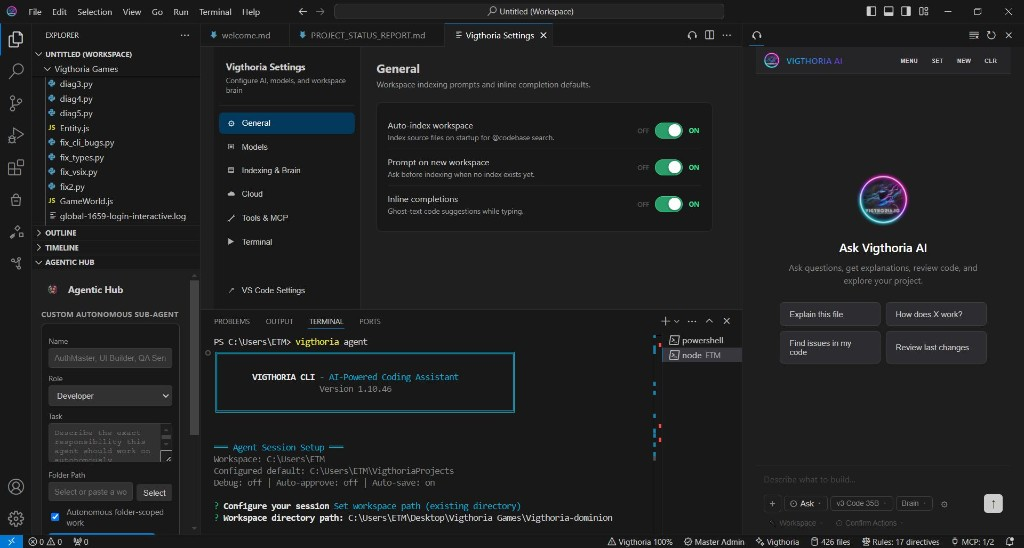
Full VS Code fork with embedded Vigthoria AI, illustrated onboarding, Canvas, Agent, and native model routing.
Terminal agent, chat, and deck mode for Workbench report sync.
Desktop app: split terminals, agent reports, file tree. Windows: download ZIP, double-click installer.
AI-powered VS Code fork with built-in Vigthoria assistant v2.2.140, capability-derived V3 IDE architecture, connected module verification, bounded owner-scoped healing, authoritative terminal completion, one-prompt/one-pipeline submission and cancellation, plain-language browser proof handoffs, free governed cloud access for Master Admin, secure BYOK across all four modes, wallet-backed PAYG for other users, Vigthoria Canvas, and DevTools Bridge integration.
/api/update/{platform}/stable/{commit} protocolManifest: proven-release-manifest.json (CLI 1.13.42 · Workbench 1.3.25)
AI terminal assistant: chat, edits, autonomous vigthoria agent, and deck mode (VIGTHORIA_DECK_MODE=1) for Workbench UI sync with highlighted architecture reports.
A desktop app with split terminals, a Main Agent pane (vigthoria agent), comfort prompt, auth-aware tools (Hyper-Loop & Templates), report panel, and workspace presets. Install Vigthoria CLI for agent terminals and login.
Install-Vigthoria-Workbench.batirm https://extension.vigthoria.io/downloads/install.ps1 | iex) No Rust or Node.js required for Workbench itself. Use the .bat file — do not open the .ps1 in a text editor.
Developers: source tarball
Optional companions — expand the three core products without cluttering the main download flow.
Cross-platform local bridge for browser debugging in Agent/Operator.
ZIP + PowerShell installer for Windows — local CDP bridge for Vigthoria Code.
Vigthoria AI for stock VS Code.
No-install browser IDE.
USB / wireless device debugging.